TUTORIAL · August 13, 2026 · 8 min read
Angular Chat App Tutorial with AG-UI
Build an Angular chat app on AG-UI where the browser owns its own tools — action, view, and ask tools rendering real components inline, plus shared state.
This post builds an Angular chat app on AG-UI where the interesting tools run in the browser.
Most chat tutorials stop at streaming text. The app in this one saves links to a reading list, renders each one as a real Angular component inside the transcript, and asks the user to confirm before it clears anything. None of that work happens on the server.
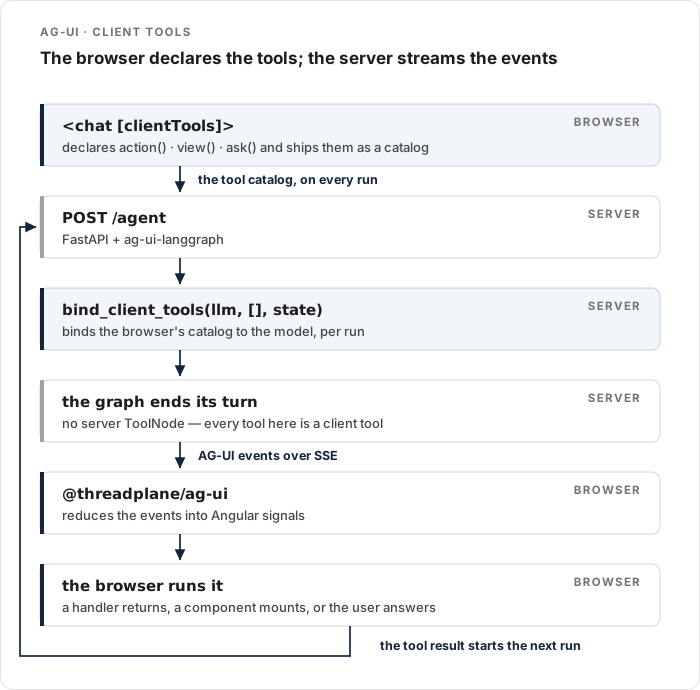
That is the part AG-UI makes straightforward, because the protocol carries a tool catalog in both directions. The browser ships what it can do, the model calls it, and the browser executes and answers.
Goals
- Stand up an AG-UI endpoint over a LangGraph agent.
- Bind it to Angular with
@threadplane/ag-uiand@threadplane/chat. - Declare
action,view, andaskclient tools the model can call. - Read agent-shared state as an Angular signal.
- Be clear about what AG-UI gives you and what it does not.
- Have fun!
@threadplane/ag-ui and @threadplane/chat are MIT-licensed for commercial
and noncommercial use. The chat installation guide
covers setup.
For a tour of the AG-UI event model and how it maps onto signals, read Build Fullstack Agentic Angular Apps Using AG-UI. This post assumes that and builds the app on top.
What are we building?
Angular <chat [clientTools]>
  -> @threadplane/ag-ui
  -> @ag-ui/client HttpAgent
  -> POST /agent + AG-UI events over SSE
  -> FastAPI + ag-ui-langgraph
  -> your graph
A reading list.
The user asks the assistant to save something, and the assistant calls add_link, which runs in the browser and mutates an Angular signal store.
Then it calls link_card to show it, and confirm_clear when the user wants the list emptied.
Three tools, three different shapes, and the server implements none of them.
How do we get an AG-UI endpoint running?
Install the integration:
python -m venv .venv
source .venv/bin/activate
pip install "ag-ui-langgraph==0.0.40" langchain-openai "fastapi>=0.115" "uvicorn[standard]" "threadplane-middleware>=0.0.1"
I am using the LangGraph integration because it is the shortest path to a running endpoint, but this is the interchangeable half. CrewAI, Mastra, Pydantic AI, AG2, and AWS Strands all expose the same AG-UI endpoint shape, and the Angular half below does not change for any of them.
Now server.py:
from typing import Annotated, Optional

from ag_ui_langgraph import LangGraphAgent, add_langgraph_fastapi_endpoint
from fastapi import FastAPI
from fastapi.middleware.cors import CORSMiddleware
from langchain_core.messages import SystemMessage, ToolMessage
from langchain_openai import ChatOpenAI
from langgraph.checkpoint.memory import MemorySaver
from langgraph.graph import END, START, StateGraph
from langgraph.graph.message import add_messages
from typing_extensions import TypedDict

from threadplane.middleware.langgraph import bind_client_tools

llm = ChatOpenAI(model="gpt-5-mini")

SYSTEM = SystemMessage(
    content=(
        "You help the user build a reading list. "
        "Use add_link to save a link, link_card to show one, and confirm_clear "
        "before emptying the list. Keep replies to one short sentence."
    )
)


class State(TypedDict):
    messages: Annotated[list, add_messages]
    # ag-ui-langgraph merges RunAgentInput.tools into state["tools"] — that is
    # the browser's tool catalog, shipped on every run.
    tools: Optional[list]
    # Any other state field is snapshotted to the client as `agent.state()`.
    saved_count: int


async def generate(state: State) -> dict:
    # Bind the client catalog per run: it arrives in state and can change.
    bound = bind_client_tools(llm, [], state)
    reply = await bound.ainvoke([SYSTEM, *state["messages"]])
    return {"messages": [reply], "saved_count": count_saved(state["messages"])}


# Every tool in this app is a client tool, so the graph always ends its turn
# after the model speaks. The browser executes the call and starts the next run
# with a ToolMessage. There is no server-side ToolNode to route to.
builder = StateGraph(State)
builder.add_node("generate", generate)
builder.add_edge(START, "generate")
builder.add_edge("generate", END)

# ag-ui-langgraph reads graph state via aget_state, which needs a checkpointer.
graph = builder.compile(checkpointer=MemorySaver())

app = FastAPI(title="agui-reading-list")
app.add_middleware(
    CORSMiddleware,
    allow_origins=["http://localhost:4200"],
    allow_methods=["*"],
    allow_headers=["*"],
)

add_langgraph_fastapi_endpoint(app, LangGraphAgent(name="chat", graph=graph), path="/agent")
The load-bearing line is bind_client_tools(llm, [], state).
AG-UI's RunAgentInput has a tools field, and ag-ui-langgraph merges it into state["tools"].
So the catalog the browser declared this run is sitting right there in graph state.
bind_client_tools turns those entries into function-tool stubs and binds them alongside your server tools — an empty list, here, since this app has none.
Bind it inside the node, not once at module scope. The catalog arrives per run and can differ between runs.
The routing is worth a sentence too.
In an app with server tools you would add a conditional edge to a ToolNode, and route to END when every call is a client tool.
Here there are no server tools at all, so the graph always ends its turn after the model speaks, and the browser picks it up.
Run it:
export OPENAI_API_KEY=…
uvicorn server:app --port 8000Sourcing a whole shared .env here is a good way to switch on auth middleware
you did not mean to enable and get a confusing 401 on /agent. Export the one
key.
How do we bind Angular to it?
npm install @threadplane/chat @threadplane/ag-ui @ag-ui/client @ag-ui/core marked zodThe provider is one line, because AG-UI's connection surface is one URL:
import { provideAgent } from '@threadplane/ag-ui';

export const appConfig: ApplicationConfig = {
  providers: [
    provideRouter(routes),
    provideAgent({ url: 'http://localhost:8000/agent' }),
  ],
};
provideAgent also takes headers for auth tokens and agentId when one endpoint serves several agents.
That is the whole config.
How does the browser get its own tools?
This is the part worth the trip.
A client tool is declared in Angular, shipped to the model as part of the catalog, and executed in the browser. There are three kinds, and they differ in what produces the result:
| Helper | What it does | Result comes from |
|---|---|---|
action() | Runs an async handler | The handler's return value |
view() | Renders a component inline | Auto-acknowledged when it mounts |
ask() | Renders an interactive component | The value the user's interaction emits |
All three are built over one signal store.
The store
Ordinary Angular. The agent never sees this — it only calls tools.
@Injectable({ providedIn: 'root' })
export class ReadingList {
  private readonly _links = signal<Link[]>([]);

  readonly links = this._links.asReadonly();
  readonly count = computed(() => this._links().length);

  add(link: Link): number {
    this._links.update((list) => [...list, link]);
    return this._links().length;
  }

  clear(): number {
    const removed = this._links().length;
    this._links.set([]);
    return removed;
  }
}
The registry
import { inject } from '@angular/core';
import { action, ask, tools, view, type ClientToolRegistry } from '@threadplane/chat';
import { z } from 'zod';

/** Call inside an injection context — it injects the browser-owned store. */
export function readingListTools(): ClientToolRegistry {
  const list = inject(ReadingList);

  return tools({
    add_link: action(
      'Save a link to the reading list. Afterwards, show it with link_card.',
      z.object({ title: z.string(), url: z.string() }),
      async ({ title, url }) => ({ saved: list.add({ title, url }) }),
    ),
    link_card: view(
      'Display a saved link with a one-line reason to read it.',
      LINK_CARD_SCHEMA,
      LinkCardComponent,
    ),
    confirm_clear: ask(
      'Ask the user to confirm emptying the reading list before doing it.',
      CONFIRM_CLEAR_SCHEMA,
      ConfirmClearComponent,
    ),
  });
}
The object keys are the tool names the model sees.
The descriptions are the only steering the model gets about when to call them, so write them like instructions, not labels — "Afterwards, show it with link_card" is doing real work in that first one.
Arguments are typed by a Standard Schema, so Zod works directly and action handlers infer their argument type from it.
A view component
The model fills the component's inputs from the schema.
Under strict: true the typed overload fails the build if the component's inputs and the schema disagree, which is a nice place for that mistake to surface:
export const LINK_CARD_SCHEMA = z.object({
  title: z.string(),
  url: z.string(),
  why: z.string(),
});

@Component({
  selector: 'app-link-card',
  changeDetection: ChangeDetectionStrategy.OnPush,
  template: `
    <article class="card">
      <h3>{{ title() }}</h3>
      <p class="why">{{ why() }}</p>
      <a [href]="url()" target="_blank" rel="noopener">{{ url() }}</a>
    </article>
  `,
})
export class LinkCardComponent {
  readonly title = input.required<string>();
  readonly url = input.required<string>();
  readonly why = input.required<string>();
}
Derive the input types with ViewProps<typeof LINK_CARD_SCHEMA> if you would rather not repeat them by hand.
An ask component
ask is the interesting one, because the component decides the result.
It announces it through injectRenderHost().result(...), and that becomes the tool result that resumes the run:
@Component({
  selector: 'app-confirm-clear',
  changeDetection: ChangeDetectionStrategy.OnPush,
  template: `
    @if (cleared() === undefined) {
      <div class="confirm">
        <p>Clear all {{ list.count() }} saved links? ({{ reason() }})</p>
        <button type="button" (click)="clear()">Clear</button>
        <button type="button" (click)="cancel()">Keep them</button>
      </div>
    } @else if (cleared()) {
      <p class="confirm">Cleared {{ removed() }} links.</p>
    } @else {
      <p class="confirm">Kept the reading list.</p>
    }
  `,
})
export class ConfirmClearComponent {
  readonly reason = input.required<string>();
  /** Spread back onto props once the ask resolves. */
  readonly cleared = input<boolean | undefined>(undefined);
  readonly removed = input<number | undefined>(undefined);

  protected readonly list = inject(ReadingList);
  private readonly host = injectRenderHost();

  protected clear(): void {
    this.host.result({ cleared: true, removed: this.list.clear() });
  }

  protected cancel(): void {
    this.host.result({ cleared: false, removed: 0 });
  }
}
Two details make this behave well.
The mutation happens here, in the component, not in a handler — an ask emits its own result and nothing sits in between to intercept it.
Once it resolves, the adapter writes the emitted value back onto the local tool call, so the component re-renders with cleared and removed as props.
That is why the template branches: the live card only shows while cleared() is still undefined, and afterwards the transcript shows a frozen line instead of buttons the user could press again.
Binding it
template: `<chat [agent]="agent" [clientTools]="clientTools" />`,protected readonly agent = injectAgent();
protected readonly clientTools = readingListTools();That is it.
Ask the assistant to save a link, and you will watch add_link execute in the browser, the sidebar count go up, and link_card mount inside the transcript as a real component.
How does the agent share state?
Anything else in graph state is snapshotted to the client and lands on agent.state():
protected readonly savedCount = computed(
  () => (this.agent.state() as { saved_count?: number }).saved_count ?? 0,
);
Which brings up a detail that is easy to lose an hour to.
The graph counts completed add_link calls.
The obvious implementation is to look for ToolMessages named add_link, and it silently returns zero forever.
Client-tool results come back carrying a tool_call_id but no name, because the adapter adds them as { id, role: 'tool', toolCallId, content }.
Match on the id instead:
def count_saved(messages: list) -> int:
    add_link_ids = {
        call["id"]
        for m in messages
        for call in getattr(m, "tool_calls", None) or []
        if call.get("name") == "add_link"
    }
    return sum(
        1
        for m in messages
        if isinstance(m, ToolMessage) and m.tool_call_id in add_link_ids
    )
For progress during a run rather than state after it, AG-UI CUSTOM events accumulate on agent.customEvents() — a LangGraph node emits them with get_stream_writer(). The custom events guide covers that path.
What happens when we swap the backend?
The Angular half does not change. That is the payoff, and it is worth being precise about what it costs.
Swapping runtimes is the provider line:
- import { provideAgent } from '@threadplane/ag-ui';
- providers: [provideAgent({ url: 'http://localhost:8000/agent' })],
+ import { provideAgent } from '@threadplane/langgraph';
+ providers: [provideAgent({ apiUrl: '…', assistantId: 'chat' })],
Those are two different functions from two different packages, not one symbol that takes both shapes.
Components stay identical because both adapters produce the same runtime-neutral Agent contract — and client tools are declared against @threadplane/chat, so the registry above moves across untouched.
The cost is a thin translation layer per adapter, and a real compatibility surface: your new backend has to emit the AG-UI events the UI reads. The event mapping reference is the checklist when a stream renders as nothing.
What doesn't AG-UI give you?
Thread history, and it is a protocol fact rather than a gap in any library.
AG-UI is event-stream-only.
It defines no server-side thread-lookup endpoint, so there is nothing to enumerate past conversations with and nothing to validate a thread id against.
injectThreadRouting() still works for a single id in the URL, but its validate callback has no backend to ask.
So a conversation sidebar over AG-UI is app-owned: you keep the list, you title the threads, you decide what "restore" means. If server-backed thread history is the feature you actually want, LangGraph exposes per-thread checkpoints and a thread API, and I walked through building exactly that in Angular Chat App Tutorial with LangChain and LangGraph.
My recommendation is simple: pick the protocol for the backend you have, not for the sidebar. Portability across agent frameworks and server-managed thread history are different features, and AG-UI is unambiguously the better answer to the first one.
What still needs work before production?
- Client tools run in the browser, so they run with the user's authority. A handler that calls your API is a client calling your API. Authorize on the server; a tool description is not an access-control policy.
- Side effects need a guard. Tools are non-idempotent by default. If a handler moves money or sends mail, pair it with a
[clientToolExecutionGuard]so a reload cannot run it twice, and mark only genuinely safe toolsidempotent: true. - Runaway loops are capped, but tune the cap. A model that keeps calling client tools stops after 10 continuation groups per user turn. Adjust with
[clientToolContinuationPolicy]and decide what the UI says when it trips. - CORS and auth.
http://localhost:4200is a development origin. Use your real one, or route through the same domain and skip cross-origin entirely. Pass tokens withheaders. - A buffering proxy breaks streaming. Disable response buffering and preserve the streaming content type, or the whole thing collapses into a spinner.
MemorySaveris not persistence. It is in this tutorial becauseag-ui-langgraphneeds a checkpointer to read state. It is not a store.
Conclusion
The good boundary in an AG-UI app is that the protocol carries capability in both directions. The server streams events, and the browser declares tools. Once both halves are true, "which framework is behind this" stops being a question your components can answer. That is the point.
Start with one action, get it mutating a signal store, then add a view for how the result should look and an ask for the moments that need a human.
That order keeps each step small enough to debug.
And when you need a conversation sidebar with real history, reach for a runtime that stores threads rather than making the protocol do something it never claimed to.
Have fun!