TUTORIAL · August 13, 2026 · 8 min read
Angular Chat App Tutorial with LangChain and LangGraph
Build a multi-thread Angular chat app on LangGraph: a conversation sidebar, server-titled threads, and bookmarkable URLs that survive a refresh.
This is how to build an Angular chat app on LangGraph — not a single chat surface, but the whole thing: a conversation sidebar, threads that keep their history, and URLs you can bookmark.
One conversation is a demo. A list of them, each restoring on reload, is a product.
The difference is smaller than you would think, because the durable part lives on the server. LangGraph already checkpoints every thread and exposes a thread API. Our job in Angular is mostly to stop throwing that away.
Goals
- Get a LangGraph server running with a graph that streams.
- Bind it to Angular with
@threadplane/langgraphand@threadplane/chat. - Add a conversation sidebar backed by the server's own thread list.
- Make reload, back/forward, and shared links land in the right conversation.
- Name the parts that are still not production-ready.
- Have fun!
@threadplane/langgraph and @threadplane/chat are MIT-licensed for
commercial and noncommercial use. The chat installation
guide covers setup.
If you only want the streaming surface and none of the app around it, read Build a Streaming Chat UI in Angular with LangGraph instead. This post picks up where that one stops.
What are we building?
Here is the whole path:
Angular <chat> + <chat-sidenav>
  -> @threadplane/langgraph
  -> @langchain/langgraph-sdk
  -> langgraph dev (thread store + checkpoints)
  -> your graph
  -> ChatOpenAI
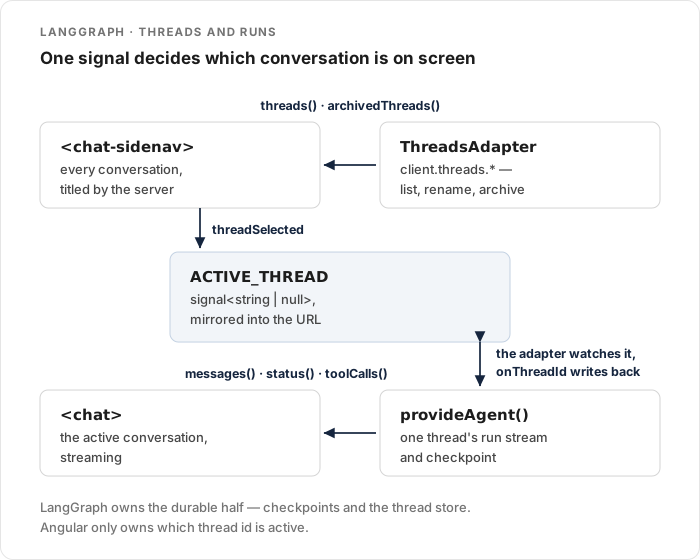
Two Angular pieces, and they read from different places.
<chat> renders the active conversation from the agent. <chat-sidenav> renders the thread list from the LangGraph thread API.
That split is the thing to hold onto. The agent knows about one conversation. The thread adapter knows about all of them.
How do we get a LangGraph server running?
The backend comes first, because the Angular side has nothing to bind to without it.
Install the CLI and the model package into a virtualenv:
python -m venv .venv
source .venv/bin/activate
pip install "langgraph-cli[inmem]" langgraph langgraph-sdk langchain-openai
Now graph.py.
A generate node, and a second node that gives the thread a title:
import os

from langchain_core.messages import SystemMessage
from langchain_core.runnables import RunnableConfig
from langchain_openai import ChatOpenAI
from langgraph.graph import END, START, MessagesState, StateGraph
from langgraph_sdk import get_client

llm = ChatOpenAI(model="gpt-5-mini")

SYSTEM = SystemMessage(
    content="You are a concise assistant for an Angular chat app. Keep answers short."
)


async def generate(state: MessagesState) -> dict:
    reply = await llm.ainvoke([SYSTEM, *state["messages"]])
    return {"messages": [reply]}


async def title_thread(state: MessagesState, config: RunnableConfig) -> dict:
    """Write a short title into thread metadata, once, after the first reply."""
    thread_id = (config.get("configurable") or {}).get("thread_id")
    if not isinstance(thread_id, str) or not thread_id:
        return {}

    client = get_client(url=os.environ.get("LANGGRAPH_API_URL"))
    thread = await client.threads.get(thread_id)
    if (thread.get("metadata") or {}).get("title"):
        return {}

    titled = await llm.ainvoke(
        [
            SystemMessage(
                content="In 3-5 words, summarize what the user is asking about. "
                "Output ONLY the title."
            ),
            *state["messages"],
        ]
    )
    await client.threads.update(thread_id, metadata={"title": titled.text().strip()})
    return {}


builder = StateGraph(MessagesState)
builder.add_node("generate", generate)
builder.add_node("title_thread", title_thread)
builder.add_edge(START, "generate")
builder.add_edge("generate", "title_thread")
builder.add_edge("title_thread", END)

graph = builder.compile()
Two things there are worth calling out.
No checkpointer. graph.compile() takes no argument.
langgraph dev — and LangGraph Platform — provide persistence themselves, and compiling one in fights the server.
This trips people up because most LangGraph tutorials you will read are about invoking a graph in-process, where you do pass MemorySaver().
title_thread calls back into the server. It is the same SDK your Angular app will use, pointed at the thread it is currently running inside.
Leaving url as None lets the SDK use its in-process transport instead of an HTTP round trip.
Add langgraph.json:
{
  "graphs": { "chat": "./graph.py:graph" },
  "dependencies": ["."],
  "python_version": "3.12",
  "env": ".env"
}
Put OPENAI_API_KEY=… in .env, then start it:
langgraph dev --no-browser --port 2024The chat key in graphs is what you will pass to Angular as assistantId.
That mapping is easy to forget later when the id does not match and every run 404s.
How do we bind Angular to it?
npm install @threadplane/chat @threadplane/langgraph @langchain/core @langchain/langgraph-sdk markedNow app.config.ts.
This is the file that does the most work in the whole app:
import {
  ApplicationConfig,
  provideBrowserGlobalErrorListeners,
  provideZoneChangeDetection,
  signal,
} from '@angular/core';
import { provideRouter } from '@angular/router';
import { LANGGRAPH_THREADS_CONFIG, provideAgent } from '@threadplane/langgraph';

import { routes } from './app.routes';

const API_URL = 'http://localhost:2024';

/** The active conversation. Module scope, so `provideAgent()` can reference it. */
export const ACTIVE_THREAD = signal<string | null>(null);

export const appConfig: ApplicationConfig = {
  providers: [
    provideBrowserGlobalErrorListeners(),
    provideZoneChangeDetection({ eventCoalescing: true }),
    provideRouter(routes),
    provideAgent({
      apiUrl: API_URL,
      assistantId: 'chat',
      threadId: ACTIVE_THREAD,
      onThreadId: (id) => ACTIVE_THREAD.set(id),
    }),
    { provide: LANGGRAPH_THREADS_CONFIG, useValue: { apiUrl: API_URL } },
  ],
};
ACTIVE_THREAD sits at module scope on purpose.
provideAgent() runs when providers are registered — before any component exists — so it cannot reference a class field.
The two options that make this an app rather than a demo:
threadId: ACTIVE_THREAD— the adapter watches this signal. Set it, and the conversation switches. You never call a "load thread" method.onThreadId— fires when the adapter creates a thread on the first submit. Writing it back into the same signal is what closes the loop.
LANGGRAPH_THREADS_CONFIG is separate because the thread list is a separate concern from the agent.
It is the config for LangGraphThreadsAdapter, which wraps client.threads.*.
How do we render the sidebar?
<chat-sidenav> is the conversation list.
One thing to know before you write the template: it has named projection slots for its own regions, but no default slot.
The chat goes beside it, not inside it.
import { ChangeDetectionStrategy, Component, inject } from '@angular/core';
import {
  ChatComponent,
  ChatSidenavComponent,
  injectThreadRouting,
  type ThreadActionAdapter,
} from '@threadplane/chat';
import {
  injectAgent,
  LangGraphThreadsAdapter,
  refreshOnRunEnd,
} from '@threadplane/langgraph';

import { ACTIVE_THREAD } from './app.config';

@Component({
  selector: 'app-shell',
  imports: [ChatComponent, ChatSidenavComponent],
  changeDetection: ChangeDetectionStrategy.OnPush,
  template: `
    <chat-sidenav
      [threads]="threads.threads()"
      [archivedThreads]="threads.archivedThreads()"
      [activeThreadId]="activeThread()"
      [actions]="threadActions"
      [agent]="agent"
      (newChat)="activeThread.set(null)"
      (threadSelected)="activeThread.set($event)"
    />
    <main class="chat-pane">
      <chat [agent]="agent" />
    </main>
  `,
  styles: `
    :host { display: flex; height: 100dvh; }
    .chat-pane { flex: 1; min-width: 0; }
  `,
})
export class ShellComponent {
  protected readonly agent = injectAgent();
  protected readonly threads = inject(LangGraphThreadsAdapter);
  protected readonly activeThread = ACTIVE_THREAD;

  protected readonly threadActions: ThreadActionAdapter = {
    rename: async (id, title) => {
      await this.threads.rename(id, title);
      await this.threads.refresh();
    },
    delete: async (id) => {
      await this.threads.delete(id);
      await this.threads.refresh();
    },
    archive: async (id) => {
      await this.threads.archive(id);
      await this.threads.refresh();
    },
    unarchive: async (id) => {
      await this.threads.unarchive(id);
      await this.threads.refresh();
    },
  };

  constructor() {
    injectThreadRouting({
      threadId: ACTIVE_THREAD,
      validate: (id) => this.threads.getThread(id).then(Boolean),
    });
    refreshOnRunEnd(this.agent, () => this.threads.refresh());
    void this.threads.refresh();
  }
}
Notice how little of this is thread logic.
Selecting a conversation is activeThread.set($event).
Starting a new one is activeThread.set(null).
Both work because the adapter is watching the signal — the sidebar does not talk to the agent at all.
ThreadActionAdapter is the right-click menu contract: rename, delete, archive, unarchive, pin, move to a project.
LangGraphThreadsAdapter already implements each of those against the SDK, so wiring them is mostly forwarding.
The refresh() after each call matters: the framework clears its optimistic override in a finally block, so an action that does not change the input list will re-render the old row.
refreshOnRunEnd re-fetches the list when a run finishes, which is how a brand-new conversation shows up in the sidebar.
How do links survive a refresh?
That is injectThreadRouting(), and it is three lines in the constructor above.
It restores the thread id from the URL on load, stamps signal changes back into the URL, and keeps the two in sync across back/forward. The URL is the only source of truth — nothing is written to localStorage, which is what makes links shareable without extra plumbing.
The validate callback earns its place the first time someone pastes a stale link.
It runs on any id that appears in the URL; returning false redirects to the bare path with replaceUrl: true, so the dead URL does not sit in history.
LangGraphThreadsAdapter.getThread() returns null on a 404 and rethrows genuine network errors, so .then(Boolean) is the whole implementation.
Your routes just need both shapes:
export const routes: Routes = [
  { path: '', component: ShellComponent },
  { path: ':threadId', component: ShellComponent },
];
Bare path means no thread, which is the welcome state.
Where do thread titles come from?
The server, which is why title_thread is in the graph at all.
LangGraphThreadsAdapter maps each SDK thread to the framework's Thread type and reads the label from metadata.title.
Threads that do not have one yet render as Untitled — configurable with titleFallback on LANGGRAPH_THREADS_CONFIG.
There is a wrinkle worth knowing, and it shows up on the very first conversation.
A new conversation appears in the sidebar as Untitled and stays Untitled for a while.
The title node writes metadata.title during the run, but the thread list keeps returning the old value for several seconds after the run ends — so the refreshOnRunEnd fetch reads a thread that is not titled yet.
My first instinct was to refresh a second time on a delay.
That does not work, and I would rather save you the detour: against langgraph dev I tried a 1.5s follow-up, then a 4s one, then a bounded poll refreshing five times at 1.5s intervals.
All three finished before the new title showed up in the list, while a direct fetch of that same thread already had it.
So do not engineer around it with a timer. The label settles on the next list refresh you were going to do anyway — the next message, a navigation, or a reload.
If you want the row correct immediately, own the label instead of waiting for it: title the thread optimistically in your own state from the first user message, and let the server's value replace it whenever the list catches up. That sidesteps the race rather than racing it.
Either way, do not make the title node block the run to keep a sidebar label in sync. For me that is the wrong trade — the title is a nicety, and the conversation should not wait on it.
What about the bundle?
One practical note, because it will be your first failed build.
A fresh ng new sets a 500 kB warning and 1 MB error budget.
A chat UI plus the LangGraph SDK lands around 1.4 MB raw, so ng build fails on budget before it fails on anything real.
Raise it in angular.json:
{
  "type": "initial",
  "maximumWarning": "2mb",
  "maximumError": "3mb"
}
You will also see a warning that p-queue, used by @langchain/core, is not ESM.
It is a bailout warning, not an error.
What still needs work before production?
The app runs now. It is not finished.
- The checkpointer has to be durable.
langgraph devkeeps threads in memory. Bookmarkable URLs against an in-memory store are a lie — the link survives, the conversation does not. Move to Postgres before you ship the sidebar. Persistence UI should match what the backend can actually restore. - Threads need owners. A
threadIdin a URL is an identifier, not proof the caller may read that conversation. Bind threads to the authenticated user on the server;client.threads.search()will happily list everything otherwise. - The API key cannot live in the browser. Right now Angular talks to
localhost:2024directly. In production put a same-origin backend-for-frontend in front, and makeapiUrlpoint at that. - A buffering proxy breaks streaming. If a gateway sits in the path, disable response buffering and preserve the streaming content type, or your token-by-token UI becomes a spinner.
- Errors need a path back. The
Agentcontract hasretry()andregenerate();<chat>wires both. Decide what a failed run should look like before a user finds out for you.
Conclusion
The useful split here is that the server already owns everything durable. LangGraph checkpoints the conversation and stores the thread; the Angular app subscribes to one thread through a signal and lists the rest through the thread adapter.
Once threadId is a signal, most of what feels like "app" is just setting it — from a click, from the URL, from a new run.
That is the part I would take away from this even if you build the UI yourself.
Start with langgraph dev, get the sidebar listing real threads, then swap in a durable checkpointer and put an authenticated proxy in front.
Then go spend your time on the parts your users actually see. Have fun!