TUTORIAL · May 21, 2026 · 10 min read
Build Fullstack Agentic Angular Apps Using AG-UI
A practical walkthrough for wiring any AG-UI backend — LangGraph, CrewAI, Mastra, Pydantic AI, and more — to a production Angular chat UI.
This is how to build a fullstack agentic Angular app on the AG-UI protocol, from the backend event stream to a signal-driven chat surface in your component.
The protocol between the agent and the UI is the durable piece of an agentic app. The model and the framework get the attention, but an open, shared wire format is what makes the work portable. AG-UI's event model maps onto Angular signals cleanly, which is what this post builds on.
Goals
- Wire an AG-UI-compatible backend to an Angular 20–22 app using
@threadplane/ag-uiand@threadplane/chat. - See how 17 protocol events become a handful of signals you read from a template.
- Handle the parts that turn a demo into a product: tool calls, interrupts, threads, fallbacks.
What is AG-UI?
AG-UI is the Agent-User Interaction Protocol. It is an open, event-based protocol for streaming an agent's state to a user-facing app over plain HTTP.
The official one-liner from the docs:
An open, lightweight, event-based protocol that standardizes how AI agents connect to user-facing applications.
That is the whole pitch. It standardizes the wire so the agent does not care what frontend you use, and the frontend does not care what backend you wrote.
It was introduced in 2025 and open-sourced after years of integrating agent runtimes into frontend apps. The wire format became the durable piece. It is now the third member of an emerging triad of agent protocols:
- MCP: agent ↔ tools.
- A2A: agent ↔ other agents.
- AG-UI: agent ↔ user.
A real production agent typically speaks all three. The interesting one for us is AG-UI, because it is the one your users see.
Why Angular devs should care
For the last two years, the most visible agentic UI libraries have been React-first. If you were building an Angular app, your options were:
- Reach for
EventSource, hand-roll the SSE parsing, and reinvent message lists, status, tool cards, and interrupts for the fifth time. - Iframe a React app into your Angular app. (Please do not.)
- Wait.
AG-UI changes the math.
The protocol is framework-agnostic, the official @ag-ui/client SDK is plain TypeScript with RxJS, and the event model is a sequence of small writes to a growing list — exactly what Angular signals are.
The whole protocol is seventeen events; you can hold it in your head.
The fullstack picture
The seams come first, before any code.
Two seams: the wire, and the contract.
The backend. Whatever you want, as long as it can emit AG-UI events. LangGraph, CrewAI, Mastra, Microsoft Agent Framework, Pydantic AI, AG2, AWS Strands, Agno. They all have first-party or partnership adapters. If your backend is not on that list, you write a small middleware that yields AG-UI events. The middleware guide walks through it.
The wire. Server-Sent Events. Plain HTTP, no WebSocket gymnastics, no custom binary framing. Your firewall, load balancer, and reverse proxy already know what to do with it.
The Angular side. This is what Threadplane provides.
@threadplane/ag-ui is the adapter. It consumes the AG-UI event stream and exposes a runtime-neutral Agent contract built from signals.
@threadplane/chat is the UI. It reads from that contract and renders.
The two are decoupled on purpose. We will get to why.
Let's wire it up
Start with a fresh Angular 20–22 app, or use an existing one — ng new if you need to spin one up.
Install the packages
npm install @threadplane/ag-ui @threadplane/chat markedmarked is the markdown renderer the chat uses for assistant messages.
It is a peer dep so you can swap it.
Provide the agent
// app.config.ts
import { ApplicationConfig } from '@angular/core';
import { provideAgent } from '@threadplane/ag-ui';

export const appConfig: ApplicationConfig = {
  providers: [
    provideAgent({ url: 'http://localhost:8000/agent' }),
  ],
};
That is the whole bootstrap.
provideAgent is the AG-UI transport. It wraps the official @ag-ui/client HttpAgent and exposes the signal-shaped contract via DI.
It is the only provider the chat components need.
Notice how little the two layers know about each other.
@threadplane/chat does not know it is talking to an AG-UI backend.
It just reads from the Agent contract.
We will lean on that boundary later.
Render the chat
// chat-page.component.ts
import { Component, ChangeDetectionStrategy, inject } from '@angular/core';
import { injectAgent } from '@threadplane/ag-ui';
import { ChatComponent } from '@threadplane/chat';

@Component({
  selector: 'app-chat-page',
  standalone: true,
  imports: [ChatComponent],
  changeDetection: ChangeDetectionStrategy.OnPush,
  template: `
    <div style="height: 100vh">
      <chat [agent]="agent" />
    </div>
  `,
})
export class ChatPageComponent {
  protected readonly agent = injectAgent();
}
That is it. Three files, maybe twenty lines of code, and you have a working streaming chat backed by any AG-UI-compatible agent.
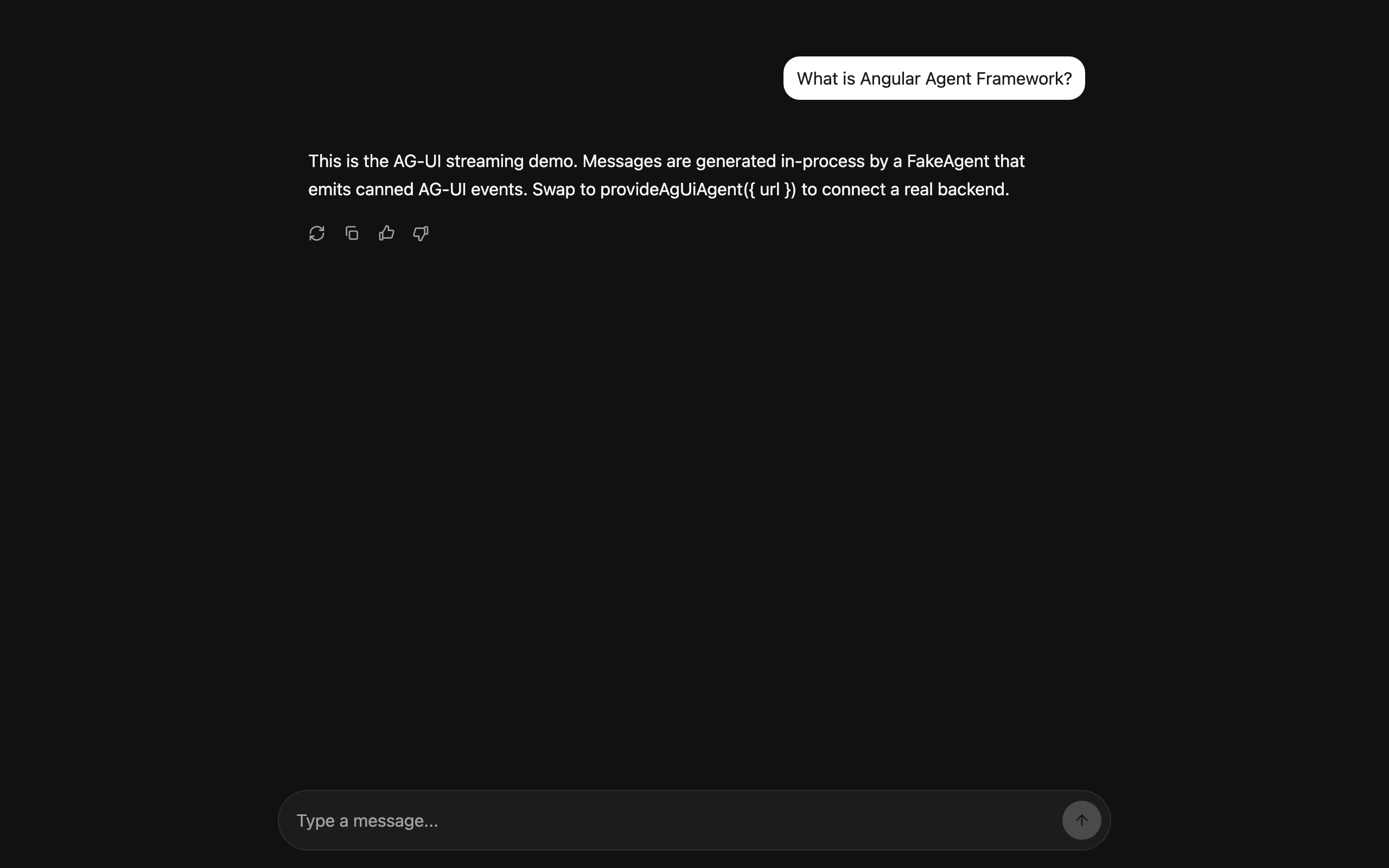
No EventSource.
No reducer.
No manual subscribe-and-render plumbing.
No store.
Spin up your agent backend, point url at it, and the chat just works.
How do AG-UI events become signals?
The AG-UI protocol has seventeen event types, grouped into five families:
- Lifecycle:
RUN_STARTED,RUN_FINISHED,RUN_ERROR,STEP_STARTED,STEP_FINISHED. - Text messages:
TEXT_MESSAGE_START,TEXT_MESSAGE_CONTENT,TEXT_MESSAGE_END,TEXT_MESSAGE_CHUNK. - Tool calls:
TOOL_CALL_START,TOOL_CALL_ARGS,TOOL_CALL_END,TOOL_CALL_RESULT,TOOL_CALL_CHUNK. - State sync:
STATE_SNAPSHOT,STATE_DELTA,MESSAGES_SNAPSHOT. - Reasoning: for thinking-style models like o1 and Claude with extended thinking.
The families each do specific work. Lifecycle answers "is something happening?" Text messages are the streaming triad familiar from chat UIs. Tool calls are deliberately incremental so you can render the intent before the arguments are fully formed. State sync uses RFC 6902 JSON Patch so the wire stays small even when the agent's state is large.
Threadplane's @threadplane/ag-ui runs each event through a small reducer that updates a handful of signals on the Agent contract:
messages():Message[], the chat history.TEXT_MESSAGE_CONTENTappends a delta to the in-flight assistant message.status():'idle' | 'running' | 'error' | 'paused'. Driven by theRUN_*events.toolCalls():ToolCall[].TOOL_CALL_STARTappends,TOOL_CALL_ARGSstreams JSON into the args,TOOL_CALL_ENDmarks complete,TOOL_CALL_RESULTpopulates the result.interrupt(): the current human-in-the-loop pause, if any.error(): populated byRUN_ERROR.
Your template reads these directly:
<p>Status: {{ agent.status() }}</p>

@for (message of agent.messages(); track message.id) {
  <chat-message [message]="message" />
}

@if (agent.interrupt(); as pause) {
  <chat-interrupt [interrupt]="pause" (resume)="agent.resume($event)" />
}
No async pipe gymnastics.
No OnDestroy to clean up a subscription.
No manual change-detection plumbing.
This works because streaming, at the data-shape level, is a sequence of small writes to a growing list — and so are signals. For me, the shape of the state is what makes Angular a good fit for agentic UIs, more than the templates or standalone components.
Tool calls and interrupts
Two surfaces separate a "chat with a model" from a "real agent": tool calls and interrupts. Both are worth a close look.
Tool calls
When the agent decides to call a tool, you get a stream of events:
TOOL_CALL_START { id: "1", name: "search_repo" }
TOOL_CALL_ARGS  { id: "1", delta: "{\"quer" }
TOOL_CALL_ARGS  { id: "1", delta: "y\": \"a" }
TOOL_CALL_ARGS  { id: "1", delta: "uth flow\"}" }
TOOL_CALL_END   { id: "1" }
TOOL_CALL_RESULT { id: "1", result: { files: [...] } }
The <chat> component renders this as a tool-call card by default.
A small block in the message list showing the tool name, the args (formatted, even mid-stream), a spinner while it is running, and the result when it returns.
I think you almost never want the default forever. You want your card for your most important tools: branded, with a click-through to the data, an approve/reject button, whatever your product needs.
<chat [agent]="agent">
  <ng-template chatToolCall="search_repo" let-call>
    <my-repo-search-card [query]="call.args.query" [results]="call.result" />
  </ng-template>
</chat>
The slot pattern is intentional. The chat ships defaults so you can demo in a day, and it gets out of your way the moment you have a real design system to hit.
Interrupts
An interrupt is the agent saying "I need a human before I do this thing."
You see them in production agents constantly: approve this database write, confirm this email send, choose between these three branches, fill in this missing field.
AG-UI surfaces interrupts as state on the agent, and @threadplane/chat renders them inline in the message list with whatever resume affordance you give it.
@if (agent.interrupt(); as pause) {
  <div class="interrupt-panel">
    <p>{{ pause.message }}</p>
    <button (click)="agent.resume({ approved: true })">Approve</button>
    <button (click)="agent.resume({ approved: false })">Reject</button>
  </div>
}
The agent stays paused until you call resume().
On the backend, your graph picks up exactly where it left off — which is the entire point of human-in-the-loop.
Threads, persistence, and the things demos skip
A single-thread chat is a demo. A real product remembers conversations across sessions and across devices.
AG-UI itself is stateless on the wire.
Every run carries a threadId, and the backend is responsible for persistence.
Most adapters expose thread CRUD as a small API:
- list threads
- create a thread
- switch threads
- delete a thread
The Angular-side pattern is to bind the threadId to a signal (usually from your router or a sidebar selection) and the chat re-reads the new thread automatically.
No manual unsubscribe. No race conditions.
protected readonly threadId = signal<string | null>(null);

constructor() {
  effect(() => {
    const id = this.threadId();
    if (id) this.agent.switchThread(id);
  });
}
How you scope threads — per project, per task, per user session — is a product decision. The one thing to avoid is shipping a chat where every refresh starts from zero.
If you want a starting point, @threadplane/chat exposes a <chat-sidebar> primitive that handles the layout without locking you into a persistence model.
Can you swap the backend without changing the UI?
This is the part that pays off the protocol bet.
Say you started with a Python LangGraph backend, shipped to production, and a quarter later you decide you want to migrate one graph to Mastra because the team writing it lives in TypeScript. With AG-UI, that is a backend change. Your Angular code does not move.
// before
provideAgent({ url: '/agents/langgraph' }),

// after
provideAgent({ url: '/agents/mastra' }),
That is the diff.
The same applies in reverse.
If you are already on a LangGraph stack and want tighter coupling than AG-UI gives you, @threadplane/langgraph is a direct adapter for LangGraph's native streaming API.
It speaks the same Agent contract to @threadplane/chat, so your UI does not change either way.
Pick whichever fits your team — the list of backends that already speak AG-UI covers most of what you would reach for, and the protocol is small enough to stay stable.
A note on the rest of the iceberg
The scaffold above is short on purpose. The framework intentionally hides the parts you do not want to think about on day one.
The parts you will want on day thirty:
- Errors and retries. Per-message retry, transport-level backoff for transient SSE drops, graceful degradation when streaming is unavailable. Some corporate proxies buffer SSE. You will find out the hard way if you do not plan for it.
- Generative UI. When the agent wants to render a richer surface than a tool-call card,
@threadplane/renderlets the backend stream a UI spec and the frontend resolves it against a registry of your approved Angular components. No arbitrary code, noeval, no design-system bypass. The agent picks from a menu you control. - Observability.
@threadplane/telemetryships a PostHog-shaped sink your application supplies and configures per environment. Point it at your own analytics rather than at a vendor you did not pick. - Testing. Because the contract is signals all the way down, the testing story is "write a signal, the chat re-renders."
@threadplane/ag-uiships aFakeAgentyou can hand-feed events to in a unit test. No SSE harness, no fixture loader, no test-only DI dance.
Each of those is its own post. The point here is just that the protocol-to-signal-to-template chain is the spine, and everything else hangs off it.
Conclusion
AG-UI standardizes the wire between the agent and the UI: it is small enough to hold in your head, and the event model maps onto Angular signals cleanly.
With Threadplane (@threadplane/ag-ui and @threadplane/chat on npm), the wiring is three lines — a provider, an inject, and a <chat> — which leaves the interesting work (tool cards, interrupt flows, generative UI, your design system) as the part you spend the day on.
That is the trade the protocol buys you.
Every Threadplane package is MIT-licensed. If you are building this inside an enterprise Angular app and want production assurance or delivery support, talk to us.