OPINION · August 9, 2026 · 9 min read
Agentic UI in Angular: Production Patterns After the Demo
Production patterns for agentic UI in Angular: signals, tool progress, approvals, durable threads, constrained generative UI, and recovery.
Agentic UI in Angular starts where the streaming chat demo ends.
A demo proves that tokens can reach a template. A production agent UI has to make a long-running, partially autonomous system understandable, controllable, and recoverable.
That difference matters. An agent can call tools, pause for a decision, change application state, and continue work after the user closes the tab. A transcript alone does not explain what the system is doing or give the user enough control over what happens next.
If you came here looking for an AG-UI Angular setup, the fullstack AG-UI tutorial covers the wire-up. This post begins after that connection works.
For me, the production question is not, “Can the agent stream?” It is, “Can the user understand, interrupt, resume, and trust the work?”
These are the patterns that answer that question.
When is plain chat enough?
Plain chat is enough more often than agent framework diagrams suggest.
If the experience is low-risk question answering, retrieval, or short-lived drafting, a message list and composer may be the right product. The user asks, the model responds, and a retry is an acceptable recovery path.
Keep it that way if you can. Every visible tool, checkpoint, approval, and generated component adds product behavior your team has to design, test, and support.
The boundary moves when the system starts doing work outside the conversation. If it can modify data, contact another person, spend money, run for minutes, delegate work, or resume later, the UI needs more than bubbles and a spinner.
The spinner is not a product model (poor spinner).
Pattern 1: Put the runtime behind an Angular contract
The first pattern is a boring boundary, and I mean that as a compliment.
Your components should read messages, status, tool calls, errors, state, and interrupts from one stable interface. They should submit user intent through that same interface. They should not know whether the backend emitted LangGraph stream chunks, AG-UI events, or something custom.
Threadplane calls this runtime-neutral boundary the Agent contract.
Runtime adapters translate their wire format into Signals and a small action surface that chat components can consume.
This keeps protocol details out of your design system and route-level components. It also gives tests a clean seam: replace the contract with writable Signals instead of recreating a server stream.
There is a cost. A neutral contract cannot pretend every runtime has the same capabilities. Checkpoint history, branching, subagents, and interrupts may be optional or adapter-specific, so feature-detect them and keep runtime-specific behavior at a deliberate edge.
I think that is healthier than finding AG-UI event names scattered through a dozen Angular components six months later.
Pattern 2: Treat the stream as state, not text
Streaming text is only one projection of a run.
A useful read model includes the current messages, lifecycle status, active tool calls, shared state, error, and any pending interrupt. Those values change at different rates, but the template needs a coherent answer every time Angular renders.
Signals fit this work well.
The adapter reduces runtime events into stable state, Angular tracks the parts each view reads, and computed() can turn those Signals into product decisions such as “can submit,” “show cancel,” or “this task is waiting for approval.”
The important part is not avoiding RxJS. RxJS is still a good fit for transport streams. The important part is stopping raw event order from becoming the component API.
Let the adapter own accumulation, deduplication, and lifecycle transitions. Let the component read the result. The Signals guide shows the boundary in practice.
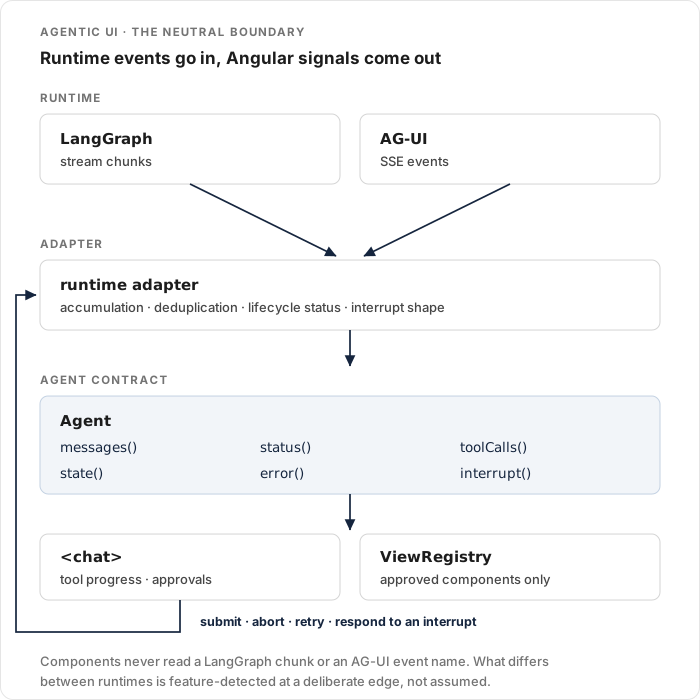
The tradeoff is that normalization can hide useful runtime detail. Keep an explicit event escape hatch for information that is not durable UI state, but do not publish messages or tool calls through two competing sources. Two sources of truth create timing bugs that are difficult to reproduce and even harder to explain to a user.
Pattern 3: Make tool progress part of the product
Tool calls are not developer logs. They are the part of the product that explains where the time went and what authority the agent used.
“Working…” tells the user almost nothing. “Searching 12 policies,” “Drafting the refund,” and “Waiting for the billing service” set an expectation and make a slow run legible.
Treat each important tool as a small state machine:
- what the agent intends to do;
- what is running now;
- what completed, with a useful result;
- what failed, and whether the user can recover.
Raw JSON arguments usually are not the right UI. Map high-value tools to product-specific Angular components, group repetitive background calls, and keep low-value orchestration noise out of the main reading path. Threadplane's tool-call templates let a team replace the default card one tool at a time.
Custom tool UI costs more than a generic trace. Spend that effort where the result changes a user's decision, where latency is meaningful, or where a failure needs a next step. The rest can use a compact default.
Pattern 4: Pause before consequential writes
An approval shown after a write is not human-in-the-loop. It is a receipt.
For a consequential action, the backend should pause before execution and persist enough state to resume from the same point. The UI should show what will change, which resource is affected, and the values the agent intends to use. Then the user can approve, reject, or edit the proposal.
Keep authorization on the server. An Angular approval card expresses a decision; it does not replace permission checks, idempotency, or an audit record.
Not every tool needs an interrupt. Approving every search or read turns safety into click fatigue. I prefer risk tiers: allow reversible reads, confirm sensitive or externally visible writes, and require stronger review for destructive or financial actions.
The interrupt and resume shape belongs on the same neutral agent boundary, while each runtime decides how to checkpoint the work. The AG-UI approval tutorial and its LangGraph counterpart cover the implementation details.
Pattern 5: Give threads durable semantics
A thread ID is not just a sidebar key. It is the identity of work that may cross runs, routes, browser sessions, and deployments.
Decide what a thread belongs to: a user, case, project, or task. Scope access on the server, use stable identifiers, and make a reload restore the same conversation from durable backend state.
Separate a thread from a run as well. One thread can contain many attempts, tool calls, pauses, and resumptions. If those concepts collapse into one loading boolean, retry and recovery behavior becomes ambiguous.
Angular routing can make the active thread explicit and shareable. The URL can restore the active ID, but only the backend can restore the work behind it. The thread-routing guide calls out that dependency, and the LangGraph persistence guide covers checkpoints and thread restoration.
This is also where backend differences matter.
The runtime-neutral Agent contract is not a message database, and the AG-UI adapter does not currently provide LangGraph's history and time-travel APIs.
Choose the adapter whose durability surface matches the product, or add an application-owned thread service instead of assuming the protocol solved persistence.
Pattern 6: Let agents choose components, not invent UI
Generative UI gets useful when the agent can choose the right surface for the job. It gets risky when “generate a surface” means “ship arbitrary code into the application.”
For me, the production pattern is a registry of approved Angular components. The agent returns a structured spec, and the frontend resolves each type against components your team owns.
That boundary keeps accessibility, localization, analytics, validation, and theming inside the design system. It also limits what the agent can render. An unregistered type cannot instantiate an Angular component.
Threadplane supports this with a ViewRegistry for json-render and A2UI surfaces.
You can add, override, or remove components as the product evolves; the generative UI guide and custom catalog patterns show how.
The tradeoff is intentional constraint. A small catalog will not express every layout the model imagines, but it will produce a UI your team can test and support. For unknown or invalid specs, define a plain-text fallback and capture enough diagnostic context to fix the contract without exposing private content.
Pattern 7: Design the unhappy path first
Agent UI failures are rarely one clean exception. A stream can stop halfway through a sentence, a tool can time out after other tools completed, an approval can outlive its session, or a saved link can point to a thread the user cannot access.
The recovery behavior comes before polishing the happy path.
- Classify errors so the UI retries only when retrying can help.
- Preserve enough completed work to explain what happened.
- Give the user a safe way to stop a run.
- Handle stale threads and unsupported generated components.
- Decide when to fall back to plain text or a non-agent workflow.
The AgentError model distinguishes connection, authentication, server, and interrupted failures so the UI can respond differently.
User aborts settle gracefully back to idle instead of becoming errors.
That is more useful than rendering Something went wrong for everything.
Testing should follow the same state model. Use a contract mock for component behavior, a fake adapter for streaming integration, and fixture replay for the small number of end-to-end paths that need the whole stack. The AG-UI testing guide lays out those layers.
Observe the transitions users feel: run duration, tool failures, interrupt wait time, retries, and thread restore failures. Keep event properties operational and out of prompt, completion, tool-input, and tool-output content unless your own policy explicitly requires otherwise. Threadplane's browser instrumentation runs through an app-owned sink, which keeps that boundary under your control.
What about backend portability?
Backend portability is the result of these patterns, not a one-line provider swap you can assume forever.
If components depend on the neutral contract, tool UI depends on normalized tool state, and approvals use a common interrupt shape, then LangGraph and AG-UI backends can share most of the Angular surface. The adapter guide documents that common boundary.
But portability has limits. If the product depends on LangGraph checkpoint history, a runtime-specific branch model, or a custom AG-UI event, that feature needs an explicit adapter boundary and its own tests.
That is fine. The goal is not to erase useful backend capabilities. It is to make the coupling visible, small, and intentional.
Conclusion
Agentic UI in Angular is not a more animated chat transcript. It is the product layer that turns asynchronous agent work into state a user can understand and actions a user can control.
Start with plain chat when plain chat is enough. When the agent gains more time, authority, or persistence, add the patterns that make those capabilities legible: a neutral contract, Signals, meaningful tool progress, approvals, durable threads, constrained components, and rehearsed recovery.
These are the production patterns I think are worth carrying into an Angular architecture review. If your team has found another one, I would like to hear what made the difference.